
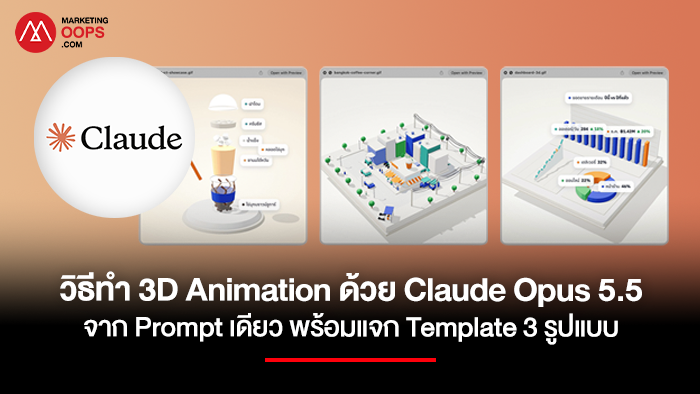
ช่วงนี้หลายคนน่าจะเห็นความสามารถของ Claude ในการทำงานวิดีโอ รวมถึงงานด้าน Visual ผ่านตามาบ้าง ทั้งการออกแบบหน้าเว็บ ทำสไลด์ ไปจนถึงการตัดต่อวิดีโอ แต่ล่าสุด หลังจาก Claude เปิดตัวโมเดล Opus 5.5 ออกมา อีกหนึ่งความสามารถที่น่าสนใจก็คือการทำ 3D Animation ที่สามารถนำมาใช้ประกอบกับงานหลายรูปแบบเช่นงานวิดีโอรูปแบบต่างๆ รวมไปถึงงานพรีเซ็นเทชั่น
หนึ่งในรูปแบบ 3D Animation ที่น่าสนใจก็คืองาน 3D มินิมอลน่ารักๆ ที่ทั้งเมืองค่อย ๆ ประกอบตัวเองขึ้นมา มีรถวิ่ง มีคนเดิน และกล้องค่อย ๆ หมุนรอบฉาก ซึ่งทั้งหมดได้มาจากการพิมพ์ Prompt ในแชตได้เลย

Marketing Oops! ลองทำ 3D Animation แบบนี้ดูด้วย Claude Opus 5.5 ทั้งหมด 5 แบบ ได้แก่ ร้านกาแฟหัวมุม เซเว่นตอนตีสอง ตลาดน้ำ แดชบอร์ดยอดขาย และกล้องบินเลียบถนนเยาวราช บทความนี้จะแจก Prompt Template ที่ใช้ได้ทันทีให้ด้วย
เริ่มต้นใช้งาน
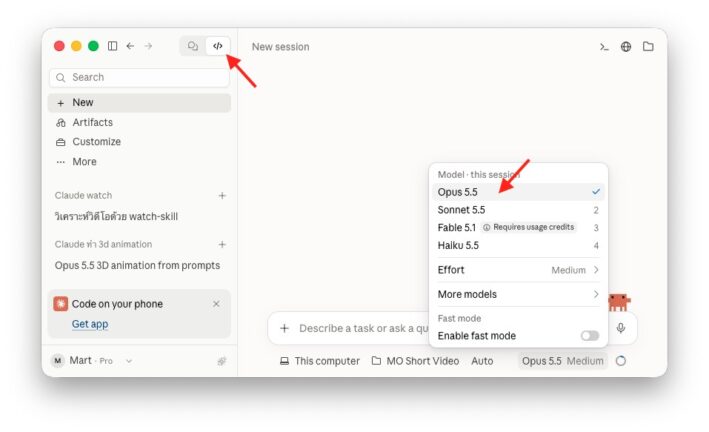
1. เปิด Claude แล้วเลือกโมเดล Opus 5.5 เข้าใช้แอปพคลิเคชั่น Claude Desktop หากใครไม่มีให้โหลดมาติดตั้งบนเครื่องไว้ก่อน จากนั้นเลือกโหมด Claude Code แล้วกดเลือกโมเดลที่มุมกล่องข้อความ เลือก Opus 5.5
2. วาง Prompt Template คัดลอก Prompt Template ในหัวข้อถัดไปมาวางในกล่องข้อความ เทมเพลตนี้ตั้งค่าส่วนเทคนิคไว้ให้ครบแล้ว ทั้งแสง เงา มุมกล้อง และขนาดเฟรมแนวตั้งสำหรับวิดีโอสั้น
3. เปลี่ยนข้อมูลในวงเล็บให้เป็นของเรา แล้วกดส่ง แก้เฉพาะข้อความในวงเล็บ [ ] คือชื่อฉาก ของที่อยู่ในฉาก สิ่งที่ขยับ โทนสี และข้อความบนการ์ด จากนั้นกดส่ง รอประมาณ 1–2 นาที Claude จะสร้างไฟล์ออกมาพร้อมตัวอย่างให้ดู ถ้ายังไม่ถูกใจ ก็พิมพ์สั่งแก้ต่อได้ เช่น “ขอภาพสว่างขึ้น” หรือ “ขยับกล้องเข้าใกล้อีกหน่อย” เป็นต้น
หมายเหตุ: ในเครื่องเราต้องมี Node และ ffmpeg ด้วยถ้ายังไม่มีก็ให้ Claude Code ติดตั้งให้ในเครื่องก่อนค่อสั่งสร้าง 3D
Prompt Template ฉบับพร้อมใช้
Prompt ทุกตัวในบทความนี้ใช้โครงเดียวกัน แต่ละบรรทัดคุมงานคนละส่วน เราเปลี่ยนเฉพาะข้อความในวงเล็บ [ ] ส่วนอื่นปล่อยไว้ตามเดิม
Build a single-file web app (HTML, CSS and JS) that plays a [10]-second 3D animation of [ฉากที่ต้องการ], then render it to a [สัดส่วนวิดีโอ เช่น 1:1, 9:16, 16:9] MP4. The clip plays once; it does not need to loop.
Tech: Three.js from a CDN using an import map. RoundedBoxGeometry for every block, MeshStandardMaterial, one sun with soft shadows plus a hemisphere light, ACES tone mapping and an ambient occlusion pass (GTAO).
World: a floating diorama on a rounded slab, packed with real, recognisable props built from simple shapes: [ของที่อยู่ในฉาก 6–10 อย่าง]. Lots of small moving parts.
Motion: the world builds itself in the first second (pieces rise and pop in with a little overshoot), then comes alive until the end: [สิ่งที่ขยับ 2–3 อย่าง].
Camera: a slow eased orbit with a gentle push-in over the whole clip.
Style: clean isometric product render. Off-white ground, [สีหลัก 2–3 สี], with one bright [สีเน้น] accent. No textures, no 3D text.
Overlay: a frosted-glass HTML card titled “[ชื่อบนการ์ด]” that appears right after the build, with three stats that tick up through the rest of the clip.
Frame: exactly [ขนาดเฟรม เช่น 1080×1080, 1080×1920, 1920×1080], no scrollbars, autoplay on load.
Determinism: everything on screen — the 3D scene AND the HTML card (fade-in, counters, any pulsing or pop-up effects) — must be computed in JavaScript from one time value t in seconds. Do not use CSS animations, CSS transitions, setTimeout/setInterval, or the real clock for anything visible, and do not call Math.random per frame (use a seeded random once at build time). Expose window.__seek(t) that synchronously renders exactly that moment; the same t must always produce the same image.
Output: write a Node script using Puppeteer (install it if missing) that opens the page at a [ขนาดเฟรม] viewport with deviceScaleFactor 1, waits for fonts to load, calls window.__seek(i / 30) for each of the [จำนวนเฟรม = วินาที × 30] frames, and takes a full-page screenshot every frame so the HTML card is included. Encode the frames with ffmpeg: H.264, yuv420p, 30 fps, [10] seconds. Save the MP4 next to the HTML file, then run ffprobe to confirm the size and frame count.
ส่วนที่ต้องเปลี่ยน
- ฉาก (บรรทัดแรก) บอกว่าโลกนี้คือที่ไหนหรือสิ่งไหน
- World ของในฉาก เป็นส่วนที่สำคัญที่สุด ยิ่งระบุของที่คนเห็นแล้วจำได้ งานยิ่งออกมามีเอกลักษณ์
- Motion อะไรขยับยังไง
- Camera มุมกล้องและการเคลื่อนกล้อง
- Style โทนสี ควรมีสีหลัก 2–3 สี และสีเน้น 1 สี
- Overlay การ์ดตัวเลขบนวิดีโอ ถ้าไม่ต้องการให้ลบบรรทัดนี้ทิ้ง
- Output: เติมขนาดเฟรมเข้าไปและเฟรมเรท
Prompt เขียนเป็นภาษาอังกฤษจะได้ผลแม่นกว่า ยกเว้นข้อความบนการ์ดที่ใส่ภาษาไทยได้ หรือจะให้ ai ปรับแก้ prompt ให้เหมาะสมตามต้องการก่อนค่อยนำไปใช้จริงก็ได้เช่นกัน
ด้านล่างคือ 5 รูปแบบที่ Marketing Oops! ลองทำจริง แต่ละแบบเปลี่ยน Template ต่างกัน และเหมาะกับงานคนละประเภท
1.เมืองจำลอง: ร้านกาแฟหัวมุมถนนในกรุงเทพฯ
รูปแบบนี้ตรงกับ Template ตั้งต้นมากที่สุด เราเปลี่ยนแค่ฉากกับของในฉาก ก็ได้โลกย่อส่วนที่ประกอบตัวเองขึ้นมา มีคนต่อคิวหน้าร้าน รถวิ่งรอบบล็อก และกล้องค่อย ๆ หมุนรอบฉาก จุดที่ทำให้ฉากนี้ดูเป็นกรุงเทพฯ คือรายละเอียดในช่อง World เช่น ตึกแถว วินมอเตอร์ไซค์ ตุ๊กตุ๊ก และเสาไฟที่สายพันกัน
Prompt Template
Build a single-file web app (HTML, CSS and JS) that plays a [10]-second 3D animation of [a busy corner coffee shop on a Bangkok street], then render it to a square 1:1 MP4. The clip plays once; it does not need to loop.
Tech: Three.js from a CDN using an import map. RoundedBoxGeometry for every block, MeshStandardMaterial, one sun with soft shadows plus a hemisphere light, ACES tone mapping and an ambient occlusion pass (GTAO).
World: a floating diorama on a rounded slab, packed with real, recognisable props built from simple shapes: [Thai shophouses with awnings, a corner café with outdoor tables and umbrellas, a street-food cart, power poles with tangled cables, tuk-tuks, motorbike taxis, cars, people, trees, street lamps]. Lots of small moving parts.
Motion: the world builds itself in the first second (pieces rise and pop in with a little overshoot), then comes alive until the end: [customers queue at the café, motorbikes and tuk-tuks loop the block, steam rises from the food cart].
Camera: a slow eased orbit with a gentle push-in over the whole clip.
Style: clean isometric product render. Off-white ground, [royal blue, teal and green], with one bright [Thai-tea orange] accent. No textures, no 3D text.
Overlay: a frosted-glass HTML card titled “[ร้านกาแฟหัวมุม · Live Sales]” that appears right after the build, with three stats that tick up through the rest of the clip.
Frame: exactly 1080×1080, no scrollbars, autoplay on load.
Determinism: everything on screen — the 3D scene AND the HTML card (fade-in, counters, any pulsing or pop-up effects) — must be computed in JavaScript from one time value t in seconds. Do not use CSS animations, CSS transitions, setTimeout/setInterval, or the real clock for anything visible, and do not call Math.random per frame (use a seeded random once at build time). Expose window.__seek(t) that synchronously renders exactly that moment; the same t must always produce the same image.
Output: write a Node script using Puppeteer (install it if missing) that opens the page at a 1080×1080 viewport with deviceScaleFactor 1, waits for fonts to load, calls window.__seek(i / 30) for each of the [300] frames, and takes a full-page screenshot every frame so the HTML card is included. Encode the frames with ffmpeg: H.264, yuv420p, 30 fps, [10] seconds. Save the MP4 next to the HTML file, then run ffprobe to confirm it is 1080×1080 with [300] frames.
2.กราฟและแดชบอร์ด 3D

รูปแบบนี้เปลี่ยนช่อง World จากฉากเมืองเป็นกราฟ 3 ชนิด คือกราฟแท่งยอดขาย 12 เดือน โดนัทชาร์ตช่องทางขาย และเส้นกราฟออเดอร์ต่อวัน ส่วน Motion เปลี่ยนเป็นกราฟแท่งโผล่ขึ้นทีละแท่ง โดนัทหมุนแล้วยกขึ้นทีละชิ้น และเส้นกราฟค่อย ๆ วาดตัวเอง
Prompt Template
Build a single-file web app (HTML, CSS and JS) that plays a [10]-second looping 3D animation of [a live sales dashboard for a café chain], made for a square 1:1 video.
Tech: Three.js from a CDN using an import map. RoundedBoxGeometry for every block, MeshStandardMaterial, one sun with soft shadows plus a hemisphere light, ACES tone mapping and an ambient occlusion pass (GTAO).
World: a floating dashboard board on a rounded slab, with three chart panels built from simple shapes: [a 3D bar chart of monthly revenue for the last 12 months (this year vs last year, the latest month highlighted), an extruded donut chart of sales channels (in-store 46%, delivery 32%, online 22%) with segments of different heights, and a 3D line chart of daily orders drawn as a glowing tube with a translucent area underneath].
Data: [this year 0.95, 0.99, 1.06, 1.02, 1.12, 1.17, 1.15, 1.24, 1.29, 1.27, 1.34, 1.42 M; last year 0.82, 0.85, 0.90, 0.88, 0.95, 0.99, 0.97, 1.04, 1.08, 1.06, 1.12, 1.18 M].
Motion: the board builds itself in the first second, then the charts animate in: [bars grow up one by one with a little overshoot, donut segments pop in and the donut slowly turns while one segment at a time lifts out, the line draws itself from left to right and a dot travels along it, the latest bar pulses like live data]. Floating HTML label chips follow the charts in 3D space.
Camera: a slow eased orbit with a gentle push-in, looping with no jump.
Style: clean isometric product render. Off-white board, [royal blue, teal and green], with one bright [orange] accent for the highlight. No textures, no 3D text (all text lives in HTML overlays).
Overlay: a frosted-glass card titled “[Corner Café Group · Live Dashboard]” with three stats that tick up.
Frame: fill a 1080×1920 frame, no scrollbars, autoplay on load.
ถ้าภาพที่ได้ยังไม่พอใจเราก็สามารถสั่งให้แก้ได้เช่น พื้นที่ใต้เส้นกราฟเป็นสีดำ เส้นกราฟดูเหมือนขาลงเพราะวางผิดแกน และป้ายบางอันล้นขอบภาพ แก้ให้หน่อย
3. Product Showcase: ชานมไข่มุกแยกชิ้นส่วน

รูปแบบนี้เปลี่ยนช่อง World จากฉากที่มีของหลายชิ้นเป็น สินค้าชิ้นเดียว วางบนแท่นสตูดิโอ ส่วน Motion เปลี่ยนเป็นภาพแยกชิ้นส่วน (Exploded View) แก้วหมุนอยู่บนแท่น แล้วแยกออกเป็นชั้น ทั้งไข่มุก ชานม น้ำแข็ง ครีมชีส ฝาโดม และหลอด พร้อมป้ายชื่อแต่ละชั้น ก่อนประกอบกลับเป็นแก้วเดิม
เราเปลี่ยนสินค้าในวงเล็บได้เลย เช่น เบอร์เกอร์ ขวดสกินแคร์ หรือหูฟัง แค่บอกให้ครบว่าสินค้านั้นมีชั้นหรือชิ้นส่วนอะไรบ้าง
Build a single-file web app (HTML, CSS and JS) that plays a [10]-second looping 3D product animation of [a brown-sugar bubble milk tea], made for a vertical 9:16 video.
Tech: Three.js from a CDN using an import map. RoundedBoxGeometry and simple primitives, MeshStandardMaterial, a soft studio key light with shadows plus a hemisphere light, ACES tone mapping and an ambient occlusion pass (GTAO).
World: [the product alone on a round white studio pedestal, built from simple shapes in layers: a clear plastic cup with condensation droplets and a blue sleeve, glossy brown-sugar pearls with tiger-stripe syrup streaks, milk tea, ice cubes, a cream cheese foam layer, a clear dome lid and a thick orange straw].
Motion: the product pops in during the first second, slowly turns on the pedestal, then [explodes into its layers — each part floats up and hangs in the air with a gentle bob while floating HTML label chips name each layer — then snaps back together into one cup].
Camera: a slow eased orbit, looping with no jump.
Style: clean studio product render. Warm off-white backdrop, [royal blue, teal and green] details, with one bright [orange] accent. No textures, no 3D text (labels live in HTML).
Overlay: a frosted-glass card titled “[บราวน์ชูการ์ไข่มุก · Live Sales]” with three stats that tick up.
Frame: fill a 1080×1920 frame, no scrollbars, autoplay on load.